How Pluvus Works
Find affiliates, send outreach, and track every conversion to payout — all on autopilot.
1.What We Do
Pluvus helps brands acquire customers through affiliate marketing without costly manual recruitment or management — by leveraging AI to automate end-to-end affiliate prospecting, outreach, campaign onboarding, and payout tracking.
Pluvus Prospecting
Matched affiliates sourced weekly, outreach sent daily — no sourcing, no spreadsheets, no manual research.
Automated Outreach
Personalized emails sent and triaged automatically at scale.
Affiliate Onboarding
Accepted affiliates are onboarded automatically — join link, tracking setup, and welcome email all handled.
1,248
Clicks
84
Conversions
$2.4k
Commission
Tracking & Payouts
Clicks, conversions, and commissions tracked end-to-end.
Where does Pluvus end and you begin?
Pluvus handles the repetitive work. You stay in control of the decisions that matter.
Pluvus Handles
- Weekly prospecting, daily outreach
- Conversion tracking & attribution
- Affiliate onboarding
- Performance reporting
- Metrics & dashboard updates
You Handle
- Creating campaigns
- Setting prospect criteria filters
- Handling custom term requests (Needs Attention)
- Processing payouts
First-Time Setup
2.The User Flow
From setup to payouts, here's the complete end-to-end journey. Six stages — most of them fully automated.
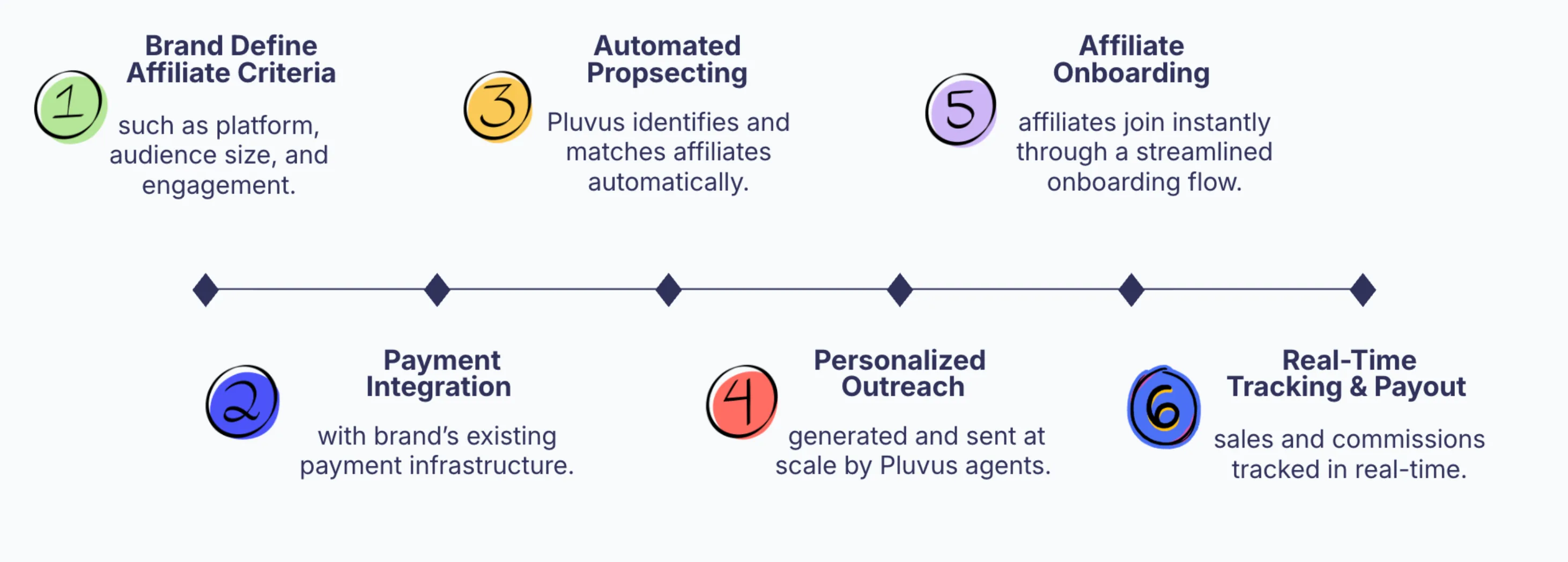
Steps 3–6 run on autopilot. You set the criteria — Pluvus handles the rest.
3.Campaign Setup
A campaign defines your affiliate offer: the commission structure, attribution window, and join link. Affiliates sign up through your campaign to start earning commissions on the sales they drive.
What You Configure
Attribution Window
How long after a click a purchase counts (e.g., 30 days)
Join Link
Unique URL affiliates use to sign up for your program
Partnership Types
Affiliate Program
Commission-based. Creators earn a percentage or flat fee on every sale. Best for scalable, performance-driven partnerships.
Creator Collaboration
Fixed-fee content deals. Pay creators for deliverables like Instagram Reels, YouTube videos, or TikTok posts. Includes content deliverable tracking and flexible payment terms.
Hybrid Deal
Combines fixed payments with ongoing commissions. Creators get paid upfront for content and continue earning on performance. The best of both worlds.
Active vs. Next Campaigns
Pluvus uses a two-slot system. The Active Campaign is what prospecting currently runs on. The Next Campaign is queued and will automatically replace the Active one at the next weekly cycle boundary (every Monday at 12:00 AM Eastern).
All campaigns support onboarding links and conversion tracking at all times — "Active" and "Next" only determine which campaign prospecting runs on.
Cycles vs. Cycle Boundaries
Weekly Prospecting, Daily Outreach
A fresh prospect list is generated each week. Outreach is sent daily to a portion of that list — paced to avoid spam flags.
Weekly Cycle Boundaries
Every Monday at 12:00 AM Eastern, the Next campaign becomes Active and Next filters take effect.
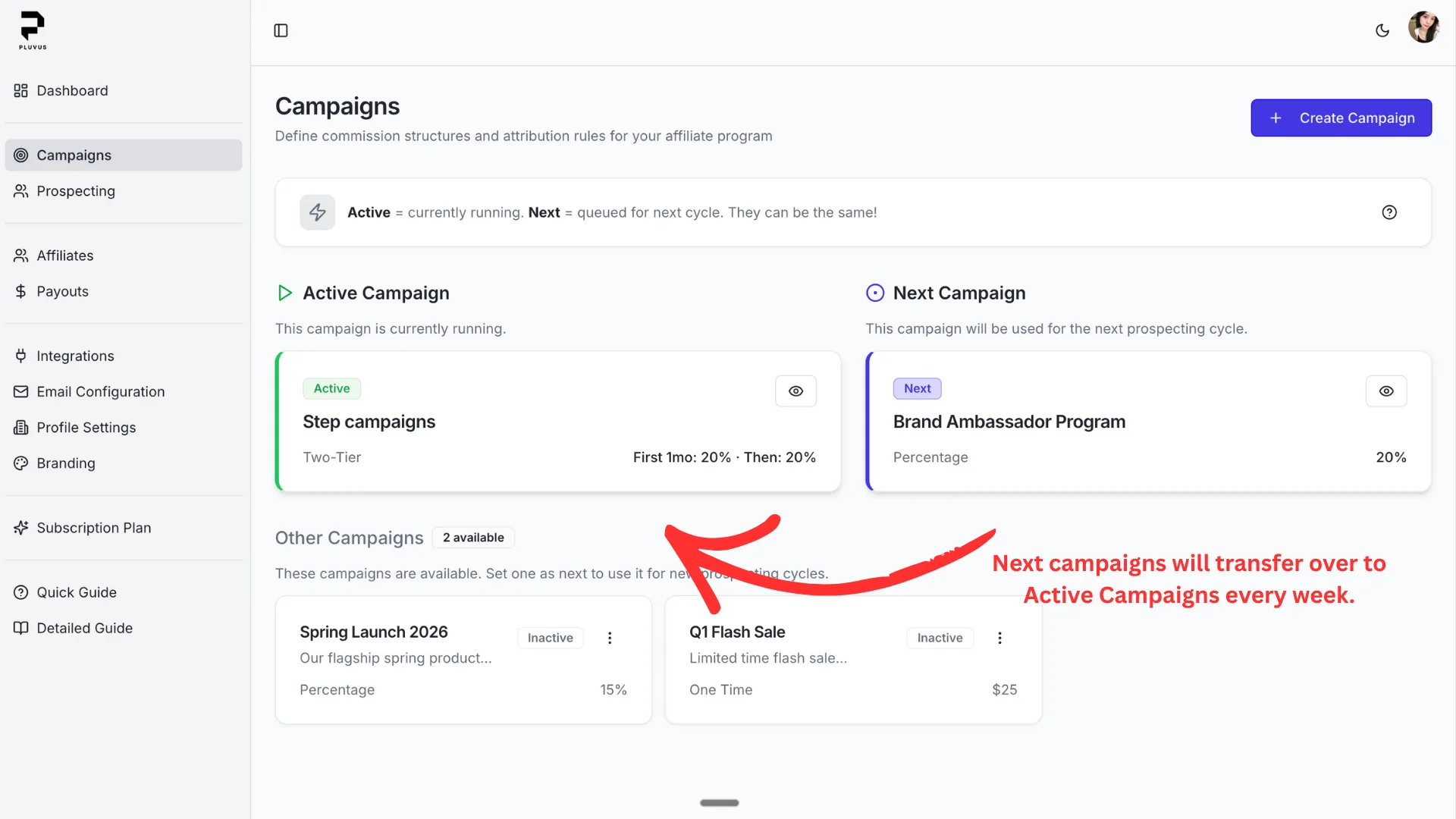
Campaign cycles with weekly boundary transitions
Want to see it in action?
Book a 30-minute walkthrough and we'll show you exactly how campaigns work.
4.Pluvus Prospecting
Pluvus finds affiliates who align with your brand, audience, and niche. Set your criteria once, and get a fresh prospect list every week with outreach sent daily — no manual sourcing required.
How It Works
Pluvus Matches Weekly
Each week, Pluvus discovers affiliates matching your criteria by analyzing social presence, content quality, and audience demographics. Outreach is sent daily.
Outreach Is Sent
Pluvus crafts personalized outreach emails and sends them automatically. You don't need to write or send anything.
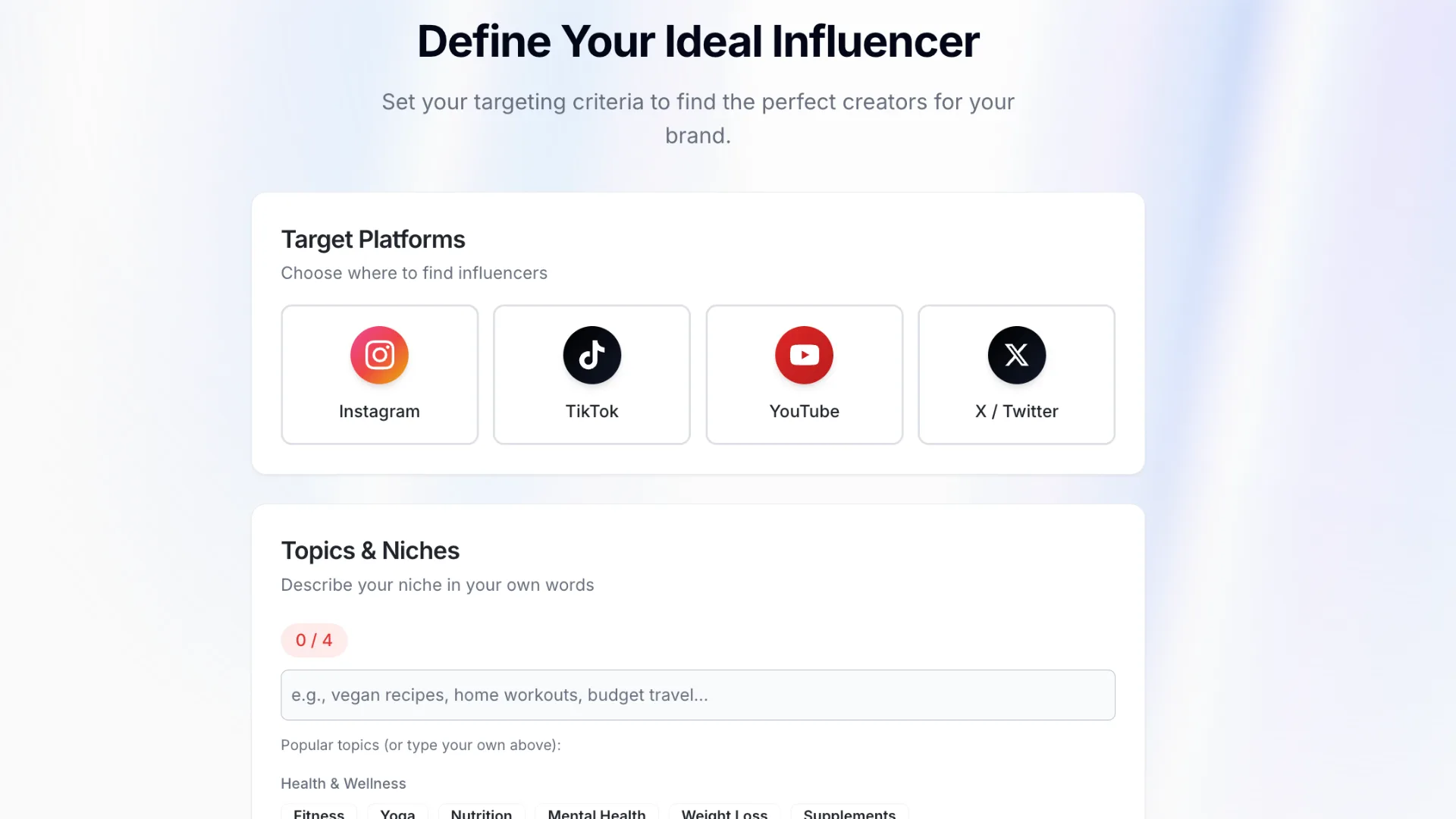
Setting prospect criteria filters
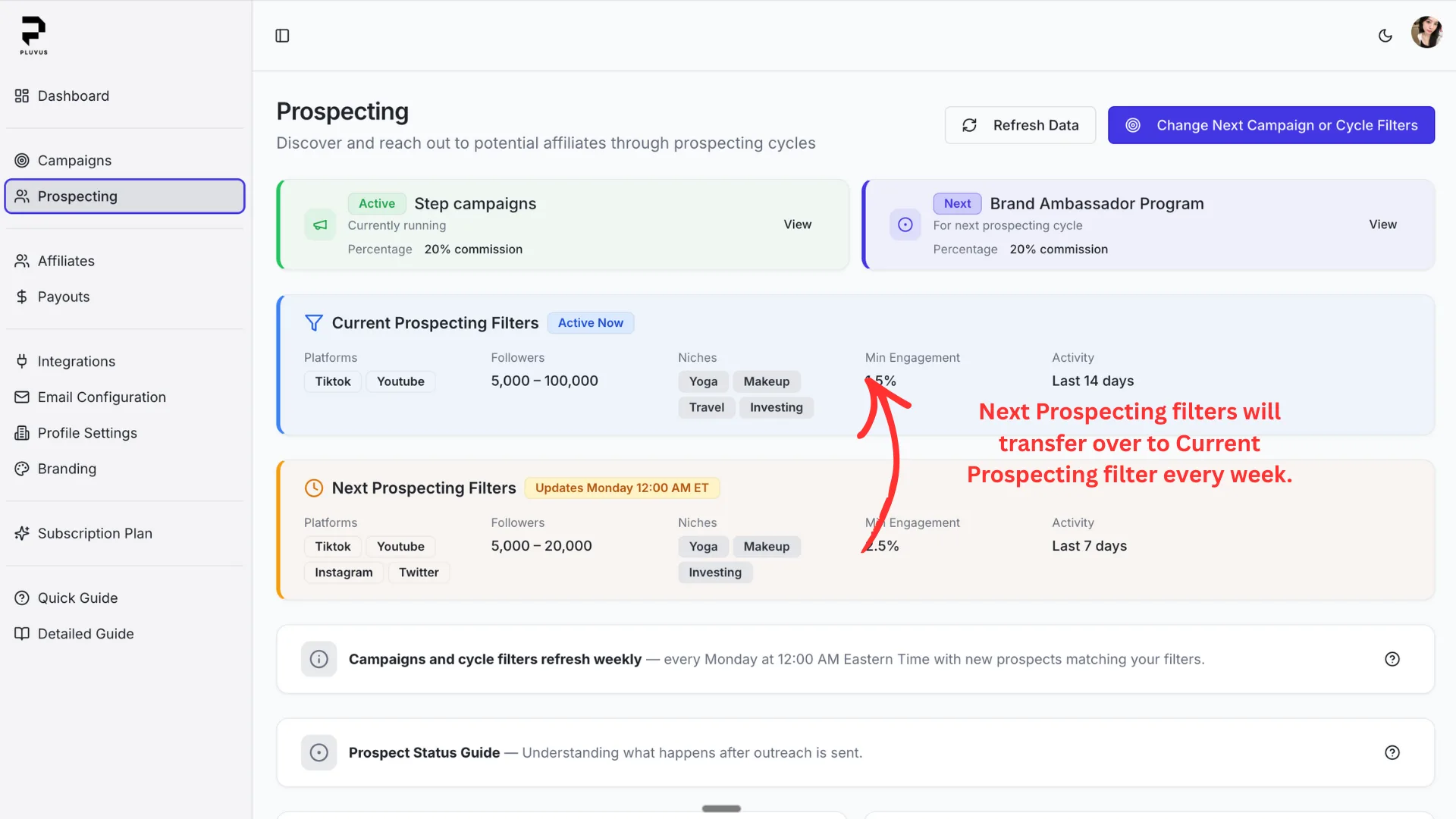
Prospecting page with weekly prospect generation
Timing Expectations
- •Prospect delivery is configured within 24 hours of account creation
- •Weekly prospecting continues for your subscription period or until you hit your plan's prospect quota
- •Filter updates are applied at the weekly cycle boundary to keep outreach consistent
5.Outreach Flow & Status Tiers
After Pluvus sends outreach, each prospect moves through a clear status lifecycle. Most resolve automatically — only edge cases need your attention.
Controlling How the AI Writes
Before outreach begins, you shape how the AI writes — not just who it contacts. The Outreach Email Guidelines page lets you set your brand profile, email style (length, formality, energy, persuasion style, personalization depth), and product links the AI can reference. Pluvus combines these preferences with influencer-specific context to draft each email.
Queued
Prospect delivered, outreach not yet sent. Pluvus will send it automatically.
No action needed
Pending
Outreach has been sent. Waiting for the affiliate to reply.
No action needed
Accepted
Affiliate accepted — Pluvus auto-sends the onboarding link so they can start promoting immediately.
Onboarding link sent automatically
Rejected
Affiliate declined the opportunity. This is a terminal state — no onboarding link is sent.
No further action needed
Needs Attention
Affiliate wants custom terms — base pay, samples, or negotiated rates. You negotiate directly.
Your action required
→ See Step 6: Human-in-the-Loop
6.Human-in-the-Loop Escalation
When an affiliate wants custom terms, Pluvus doesn't guess — it loops you in at exactly the right moment so you can negotiate directly.
How "Needs Attention" Works
Affiliate Replies with Custom Request
The affiliate responds to outreach asking for different terms — base pay, samples, higher commission, etc.
Pluvus CCs Your Profile Email
Pluvus adds your profile email into the existing email thread. You see the full conversation history.
You Negotiate Directly
Reply in the same thread to discuss terms with the affiliate. No separate system or inbox required.
Send Onboarding Link Manually
Once you agree on terms, go to Campaign Details → copy the Affiliate Onboarding Link → send it to the affiliate.
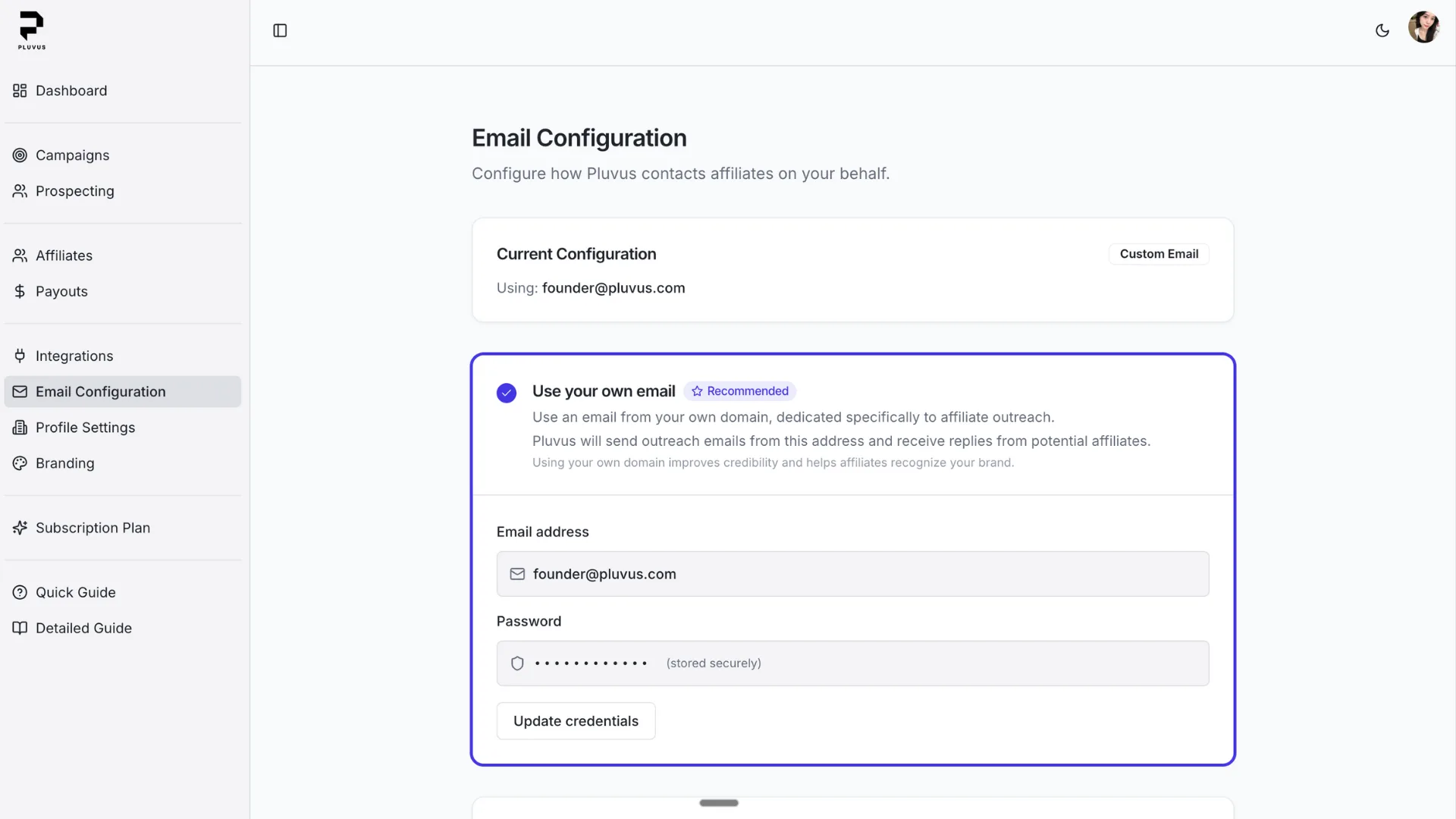
Configure your profile email in Settings — this is where escalation notifications are sent
Two emails, two completely different jobs:
Outreach Email
- Configured in Email Configuration or during onboarding
- Affiliate-facing — they see and reply to this address
- All automated outreach is sent from here
Merchant Contact Email
- Configured in Profile settings
- Used for escalation CCs when affiliate flagged "Needs Attention"
- Your personal/business inbox — never shown to affiliates
These serve completely different purposes. Changing one does not affect the other.
Pluvus handles 90% automatically. The 10% that needs a human? We loop you in at exactly the right moment.
Have questions about the outreach flow?
Let's walk through it together in a live demo.
7.Negotiated Deals & Creator Onboarding
Beyond automated prospecting, you can create custom deals for specific creators with personalized terms. This is how you handle creator collaborations, hybrid partnerships, and any deal that goes beyond standard commission rates.
How It Works
Create a Deal
Set the creator's name, email, reward structure (percentage, flat, tiered), fixed payment amount, and payment terms (upfront, split, or post-delivery).
Send Onboarding Link
Pluvus generates a unique branded link. The creator sees your logo, colors, campaign details, and their personalized terms.
Creator Completes Onboarding
They enter payment details (PayPal) and optionally sign an e-signature contract via Firma.
Deal Activates
The creator gets their tracking link, product access (if enabled), and a welcome email. Payment obligations are auto-created based on the terms.
Payment Terms
Pay After Post
Full payment due after content delivery/approval
50/50 Split
Half upfront, half after delivery
Full Upfront
Entire payment due immediately
Reward Structures
Percentage Commission
e.g., 20% of each sale
Flat Fee Per Sale
e.g., $25 per conversion
Tiered Rates
Rates increase with volume (e.g., 20% up to $1K, 25% after)
Variable Over Time
Different rates for different periods (e.g., 20% first 3 months, 15% after)
E-Signature Contracts
When a campaign requires contracts, creators sign via Firma before activation. The contract is embedded directly in the onboarding flow — no separate tools or emails needed.
8.Tracking & Payouts
Pluvus tracks every click, conversion, and commission automatically. You process the actual payments on your own schedule — Pluvus never touches your money.
How Attribution Works
When someone clicks an affiliate's link, a tracking window begins (the "attribution window," configured per campaign — e.g., 30 days). If they purchase within that window, the affiliate gets credit for the sale.
Click
Visitor clicks affiliate link
Window
Attribution period begins
Purchase
Customer buys within window
Credit
Affiliate gets commission
What Gets Tracked Per Affiliate
Clicks
How many people clicked their affiliate link
Conversions
Purchases attributed to the affiliate
Revenue
Total sales generated through their link
Commission
Amount earned based on your campaign rules
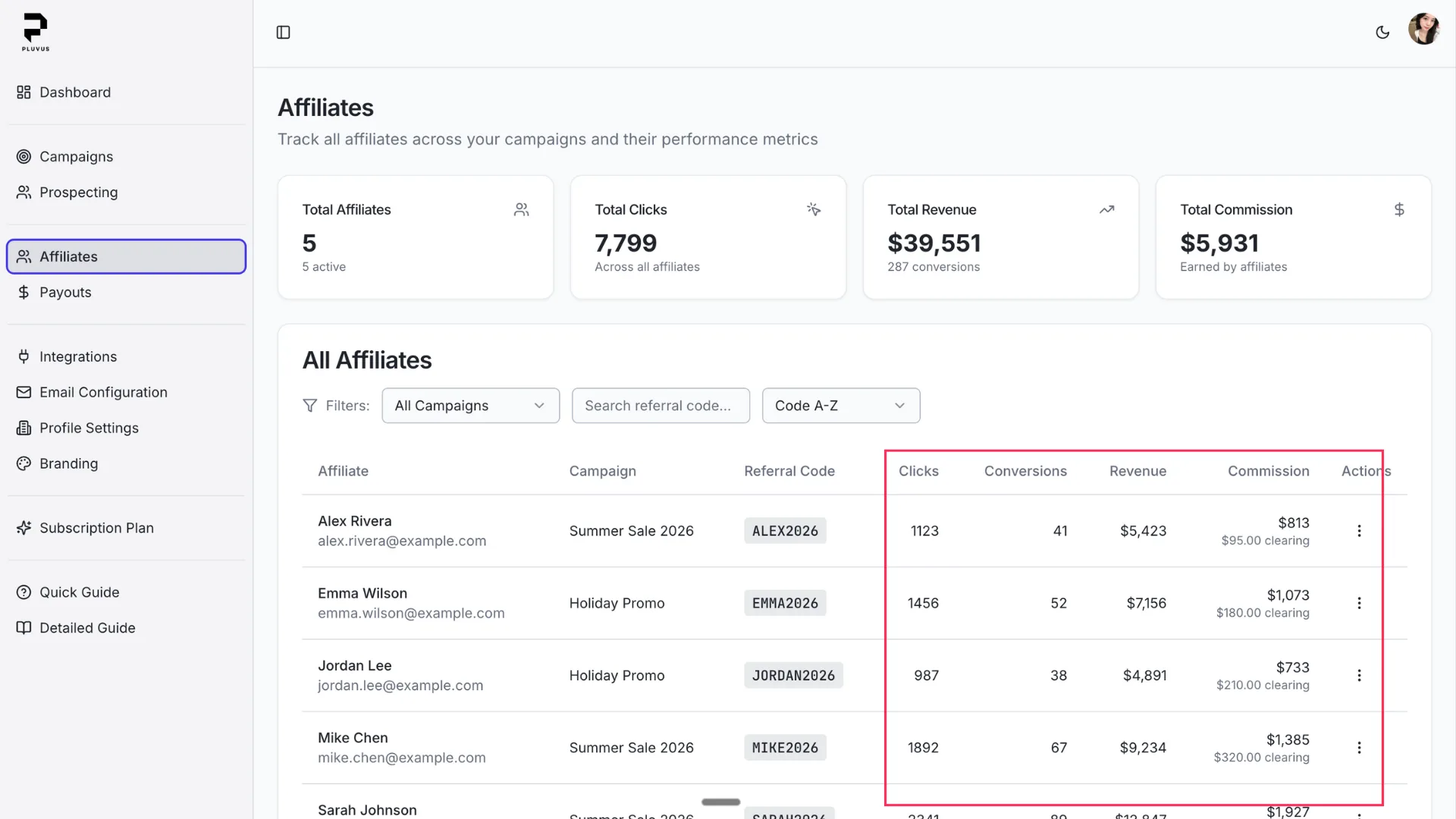
Affiliates table with performance metrics
What Counts as a Valid Conversion
Valid conversions
- • Purchase made within the attribution window
- • Order confirmed in Shopify/Stripe
- • Order verified as legitimate
Does NOT count
- • Purchases outside the attribution window
- • Rejected or invalid orders
- • Test orders (if configured to exclude)
Affiliate Tracking for Free Trials
When a customer signs up for a free trial through an affiliate link, Pluvus captures the attribution but does not generate a commission — because no revenue has been collected yet. The affiliate is credited once the trial converts to a paid subscription.
Click
Customer clicks affiliate link
Trial Signup
Customer starts a free trial
Attribution Stored
Pluvus records the affiliate mapping
No Commission
Revenue is $0, no commission created
First Payment
Trial converts, commission is calculated
You only pay affiliates when you make money
Free trial signups are tracked for attribution, but commissions are only calculated when a real payment is processed.
The Clearing Period (14 or 30 Days)
When a conversion happens, the commission starts as provisional. After the clearing period — either 14 or 30 days depending on the merchant's program — it becomes final (payable). This buffer protects you against:
- •Fake, falsified, or manipulated orders
- •Rejected or invalid orders
- •Orders that are later refunded or cancelled
Provisional
Recent conversions still in the clearing period (14 or 30 days depending on the program). Wait for clearing to pass.
Final
Cleared conversions, safe to pay. Process payout when ready.
Payout Workflow
- 1Conversions are tracked automatically
- 2Commissions accrue (provisional status)
- 3Clearing period passes (14 or 30 days depending on the program)
- 4Commissions become payable (final status)
- 5You review and process payouts externally (e.g., PayPal)
- 6Mark payouts as complete in Pluvus
Fixed Payment Obligations (KOL/Hybrid Campaigns)
For creator collaboration and hybrid deals with fixed payments, obligations follow a three-stage approval flow:
Pending
Deal finalized, awaiting your approval
Approved
Ready for payout alongside cleared commissions
Paid
Payout processed, obligation complete
Approved obligations appear in "Available to Pay" on the Payouts page, separate from commission tracking.
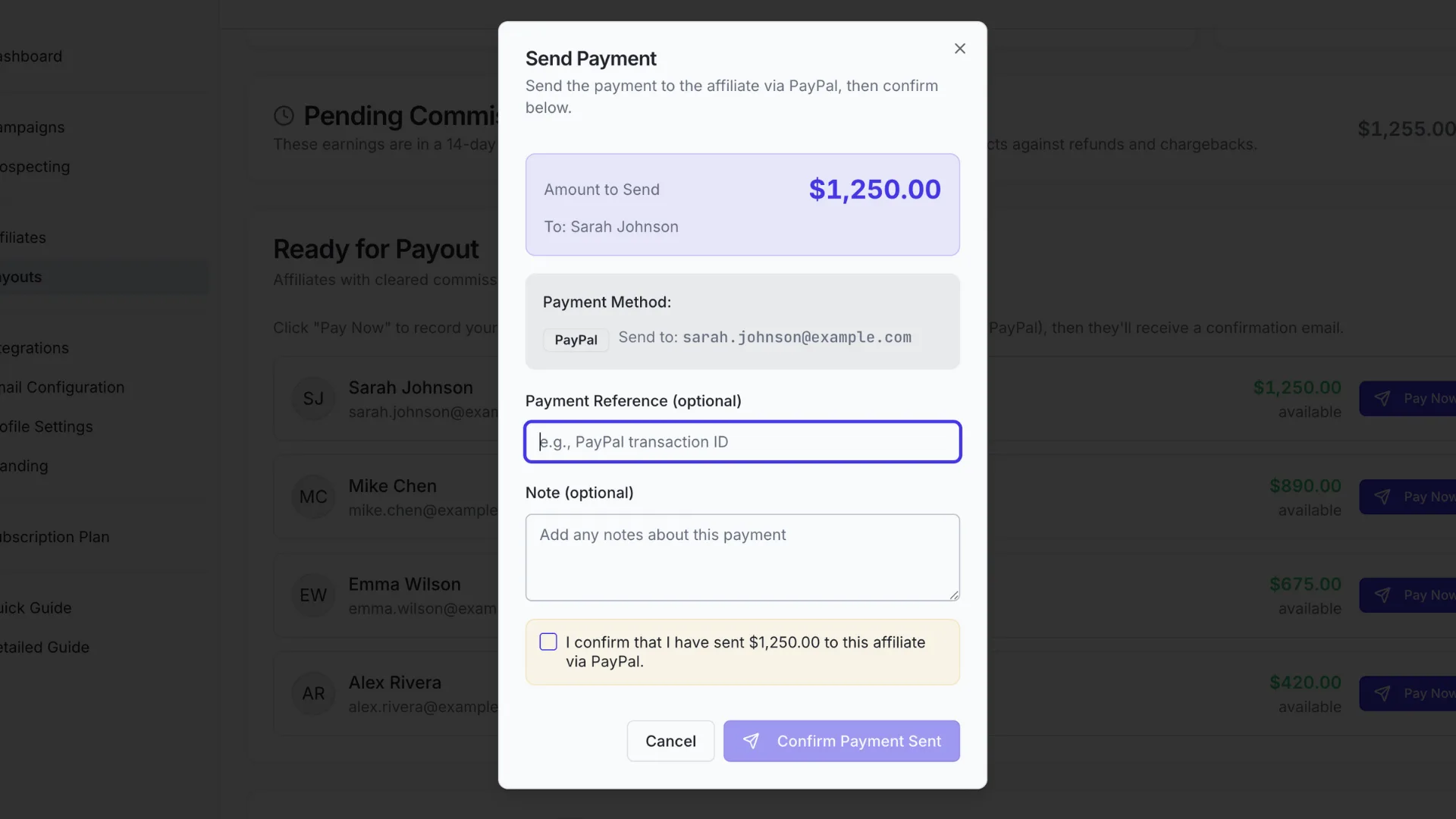
Payouts table showing the payment process
Payout Confirmation Lifecycle
When you mark a payout as "sent" in Pluvus, your affiliate immediately receives an email containing your store name, the payout amount, a "Confirm Received" button, and a "Report an issue" link.
The affiliate has a 7-day window to respond. They can confirm receipt (settling the payout), report an issue (flagging it as disputed), or simply do nothing — in which case the payout auto-settles after 7 days.
- 1You mark a payout as "sent" from the Payouts page
- 2Affiliate receives an email with the amount and confirmation link
- 3Affiliate clicks "Confirm Received" or "Report an issue"
- 4Payout status updates to Settled or Disputed accordingly
Sample email your affiliate receives
Payout Sent!
Hi Sarah,
Great news! Acme Store has sent you a payout of:
Please confirm once you've received the payment:
Didn't receive the payment? Report an issue
This email was sent by Pluvus on behalf of Acme Store.
If you have questions about this payout, please contact Acme Store directly.
Subject line: "You've received a payout from Acme Store"
Sent
You've marked the payout as processed. The affiliate receives the confirmation email shown above.
Settled
Affiliate clicked "Confirm Received" — or 7 days passed with no response. The payout is complete.
Disputed
Affiliate clicked "Report an issue." You'll be notified and must resolve it manually.
Payment Received!
Thank you for confirming your $245.50 payout. This payment is now settled.
Dispute Reported
We've noted that you haven't received the $245.50 payout. The merchant has been notified.
What the affiliate sees after clicking the link in the email
9.Affiliate Product Access
Optionally give affiliates access to your product before they start promoting. Authentic experience leads to better content and higher conversions.
Two Ways to Provide Access
Promo Code
Share a discount or free-access code. Affiliates receive the full code and benefit description in their welcome email after joining your campaign.
Manual Contact
Affiliates are shown your contact email so they can request access directly. Best for products that require individual onboarding.
Where Affiliates See Product Access
Welcome Email
Full promo code and benefit description are included after the affiliate is accepted into the campaign.
Join Page
A teaser only — affiliates see that product access is available, but the actual code is not revealed until they join.
Benefit description powers AI outreach
The benefit description you enter (e.g., "1 month free for affiliates who sign up") is also used by the AI outreach agent when crafting emails to prospective affiliates. Fill this in before outreach runs so the agent can reference the specific benefit in its messaging.
10.Your Data, Your Control
Transparency matters. Here's exactly what Pluvus accesses, what it doesn't, and how your data stays secure.
Data Access at a Glance
What Pluvus Sees
- Order events (for conversion tracking)
- Attribution data (clicks, referral codes)
- Affiliate performance metrics
- Payment amounts (for commission calculation)
- Order status (to verify legitimacy)
What Pluvus Does NOT See
- Full customer PII
- Payment card details
- Your complete customer database
- Historical data before integration
How Your Data Flows
Integration
Shopify or Stripe connects securely via API
Tracking
Clicks and referrals are logged in real time
Attribution
Purchases are matched to the referring affiliate
Reporting
Commissions and metrics appear on your dashboard
Pluvus tracks commissions but does NOT process payments
You pay affiliates through your own systems (PayPal, bank transfer, etc.). Pluvus never holds or transfers funds on your behalf. We calculate what's owed — you decide when and how to pay.
12.Ready to Automate Your Affiliate Program?
Join merchants who've replaced manual affiliate management with Pluvus-powered automation. Set it up once, and let Pluvus handle the rest.